Hand everyone over to FMS
Move every member from the old membership plugin (PMPro) to FMS together, on one agreed morning. The website is gated by PMPro or by FMS, never both. The Cutover page is the checklist for that morning.
You'll need
- The Owner or Membership manager role to press buttons and tick steps. Every other role can read the page
- The morning agreed with the Business owner (decision cards 18 and 52)
- Someone at the website's admin pages at the same time. See Step 3: Cutover
- Production, for the real morning. In a sandbox the page works the same, and says it is a rehearsal
Read the page
Open Settings, then the Migration tab. The page is titled Cutover.
The top card says who gates the website now:
| It says | Means |
|---|---|
| The website is gated by PMPro | Members are imported and held. Nobody has moved yet |
| Hand-over in progress: N still on PMPro | Some members moved and some did not. Finish, or go back |
| The website is gated by FMS since … | Everyone moved |
| No members held | Nothing has been imported from PMPro yet |
Every row below has a state and a chip saying who does it:
| Chip | Who |
|---|---|
| Console | You, on this admin portal. The row has a button to the screen |
| Website | Someone on the website's admin pages. Tick Mark done when it is done |
| Server | A developer or an owner, on the server |
| By hand | A person checks it by looking |
A green tick is done. Amber needs attention. A grey circle is not done yet. A tick shows who ticked it and when, for every colleague.
Before the morning
Get every row green, or decided, before the morning. Once FMS gates the website nothing compares FMS with PMPro any more.
| Row | Green when | Who |
|---|---|---|
| Stripe accounts imported | A Stripe import ran in the last 24 hours | Console, an owner |
| Member export imported | The member export was imported in the last 24 hours | Console, an owner (Members → Import from WordPress) |
| Verify clean | The last Verify found 0 problems | Console, an owner (Members → Import from WordPress) |
| Consolidation run and double billing fixed | Ticked by hand | Console |
| Website checks green | Ticked. On the website: FMS Membership → Run checks | Website |
| Backups taken | Ticked. A backup of FMS and of the website, both today | Server |
| Live payments armed | Stripe writes are armed and no Stripe account is read-only | Server |
| Background work running | This environment's background work runs | Server |
| Failed updates | None | Server |
Two amber rows appear only when they apply:
| Row | Fix it by |
|---|---|
| N members have no website account | Checking their address in WordPress, then importing again. Or the member page's Website account card |
| N members are on a price FMS does not know | Mapping that price to a plan on Connections |
Verify lists every name
On Members → Import from WordPress, Verify now lists every row of each group, not a sample. Each group shows 20 rows, then Show all N. Download list (.csv) saves the whole group as a spreadsheet.
Members charged twice who are still on PMPro
Consolidation fixes a member charged twice even while PMPro still serves them. The fix says This member is still on PMPro. PMPro hears about the cancel and may end their PMPro membership early. Do it on the morning, or first check which subscription PMPro bills.
The morning
In this order, in one sitting.
- Download a fresh member export on the website. Import it on Members → Import from WordPress (Open Import), run the Stripe import, then Verify there. Row 1 turns green when all three ran in the last 24 hours.
- On the website, tick Enable FMS gating. Back here, press Mark done on row 2.
- Press Hand over everyone… on row 3. Read the counts and every line under Read before you go on. A step not ticked yet is listed there.
- Press Hand over N members.
- On the website, tick New members join through FMS. Press Mark done on row 4.
- On the website, press Swap pages, then Sync restrictions from PMPro, then deactivate PMPro. Press Mark done on row 5.
- Sign in on the website as a card member, a free member and a team member. Read Health. Press Mark done on row 6.
This is the cutover
Every member on PMPro is served by FMS within about five minutes. FMS charges, changes and cancels for them from then on.
Only the hand-over button is ever greyed out: once FMS gates the website, and when nobody is on PMPro.
Rehearse it in a sandbox
In a sandbox the whole page works, so the rig can rehearse the morning. The top card and both dialogs say Sandbox: a rehearsal. Nothing here reaches the website's real members.
Check it worked
- A green line says N members handed over to FMS, with the Mailchimp updates queued
- The top card reads The website is gated by FMS since …, and On PMPro reads 0
- On Members, no row carries an On PMPro badge and the Served by filter is gone
- Five minutes later, a member signs in on the website and sees FMS's account page
- Settings → Audit shows one
migration.handoverrow under your name, and one row per tick
What happens straight after
The hand-over queues one Mailchimp update per member. They go to the real audience a few at a time. For about 22,000 Community members this takes hours. New members' updates go first, and payments never wait for them. Watch the queue on Health.
Go back, the same morning only
If the first checks fail, go back before readers notice. Only the same morning. After that PMPro's copy is out of date.
- On the website, switch PMPro back on and untick Enable FMS gating.
- Here, press the red Hand back everyone… in Go back.
- Read the dialog. Members who joined through FMS stay with FMS. Press Hand back N members.
What a hand-back does not undo
- A cancel or plan change made through FMS meanwhile stays in Stripe.
- PMPro's copy of a free or bank-paid change made in FMS is out of date. Fix it in PMPro by hand.
- Members who joined through FMS stay with FMS. The dialog says how many.
Stragglers
If the top card says Hand-over in progress, an amber line says how many are still on PMPro. Press its Hand over everyone… to finish.
A member Verify reports as missing after the morning: run the member import again. They arrive On PMPro. Open their page and press Hand over this member. Only that member moves, even on a team.
A team's page shows Still on PMPro while its people are held. It has no button. Its people move with everyone on the Cutover page.
Members still on PMPro
Until the hand-over, a member's page shows a yellow Still on PMPro box. The membership buttons stay visible but greyed out. Pointing at one says This member is still managed by the old membership system (PMPro). Hand them over on the Migration page first. Changing their name, email, notes or website login still works.
On Members they carry an On PMPro badge, and Renew and Stop are greyed out. Use the Served by filter to list On PMPro or On FMS members. It shows only while both kinds are in the list.
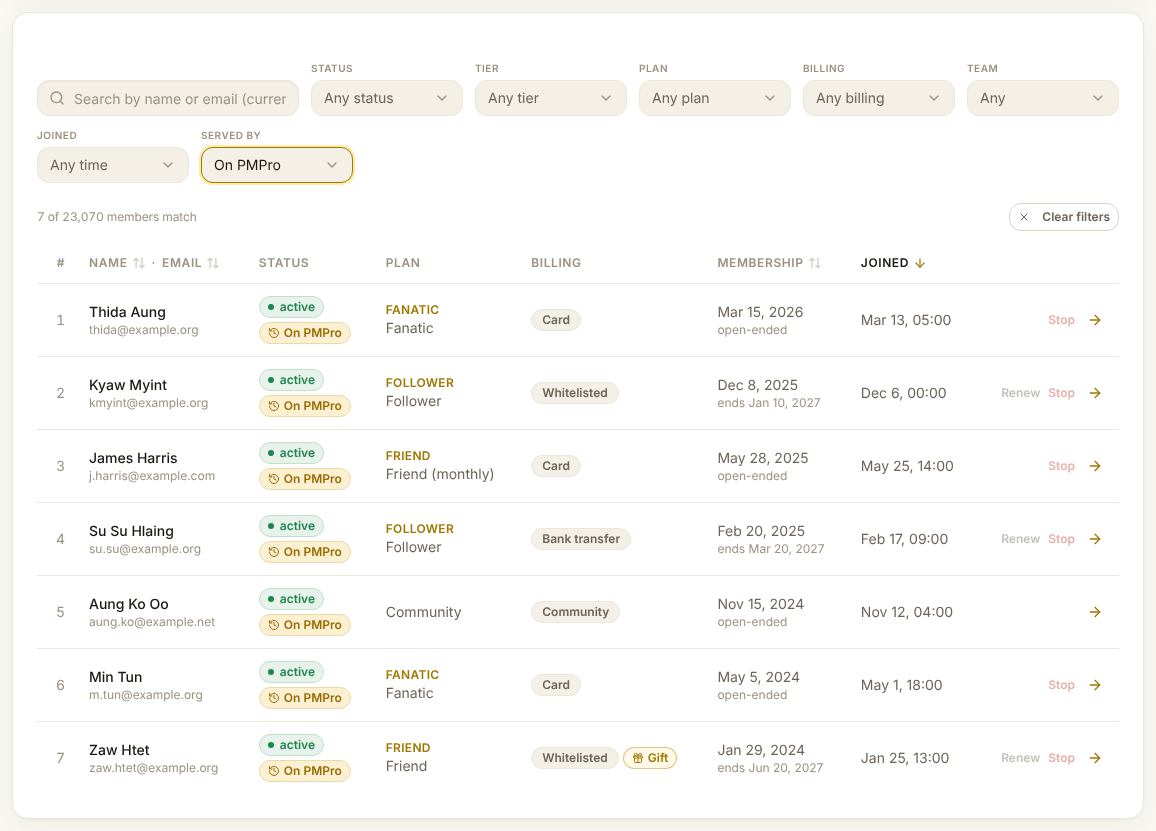
What FMS does, and does not do, for a member still on PMPro
FMS keeps their record current from Stripe and from each import. It sends them no email, makes no Mailchimp change and does not move their billing. PMPro does all of that until the hand-over. The one exception is fixing a member charged twice on Consolidation.