Import and verify members from the old plugin
Bring the old plugin's (PMPro's) members into FMS, check every one of them, and end the ones PMPro has since removed.
You'll need
- The Owner role. Other roles do not see the Import from WordPress button
- A fresh member export from WordPress (FMS Member Gate 0.52.0 or later). See Step 2: Data
- Every Stripe account imported first. See Step 2: Data
Two cards, two files
The Import from WordPress page has two numbered cards for two different files. This guide covers card 1, the WordPress member export. Card 2 takes the Mailchimp audience export. See Keep members' newsletter opt-outs.
- Open Members and press Import from WordPress. Use card 1, Members and memberships — the WordPress export.
- Press Choose file… and pick the export.
- Read the grey From the export file box. See What the file says.
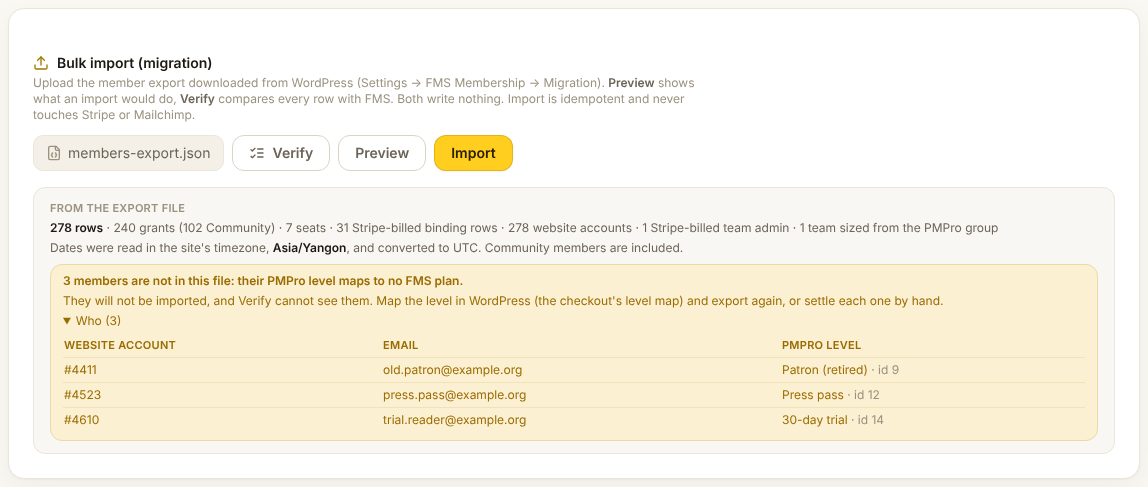
- Press Preview. Nothing is written.
- Read the counts. Wait for the green Looks clean — press Import to apply.
- Press Import, read the list in the dialog, and press Import N rows.
- Press Verify. Wait for the green PMPro and FMS agree.
- If a box lists held members the file no longer carries, follow End the members PMPro removed.
Check it worked
- Verify shows PMPro and FMS agree — every row is in place or served by FMS.
- No box lists members the file no longer carries
- Migration shows Last member import in green
What the file says
The grey box reads the file itself, before FMS is asked anything.
| Line | Meaning |
|---|---|
| Rows, grants, seats, binding rows | What the file holds. Binding rows are members who pay through Stripe. |
| Dates were read in the site's timezone | The old plugin's dates were converted from that timezone. |
| The file names no timezone | The export came from an older plugin that read dates as UTC. Update FMS Member Gate and export again. |
| N members are not in this file | Their old level matches no FMS plan. Open Who for each one's level. |
Members left out of the file
They are not imported, and Verify cannot see them. Map their level in WordPress and export again, or settle each person by hand. The panel never says Looks clean while any are listed.
When it says "Not clean yet"
The yellow box names each problem with its count. Fix each at its source, export again, and preview again.
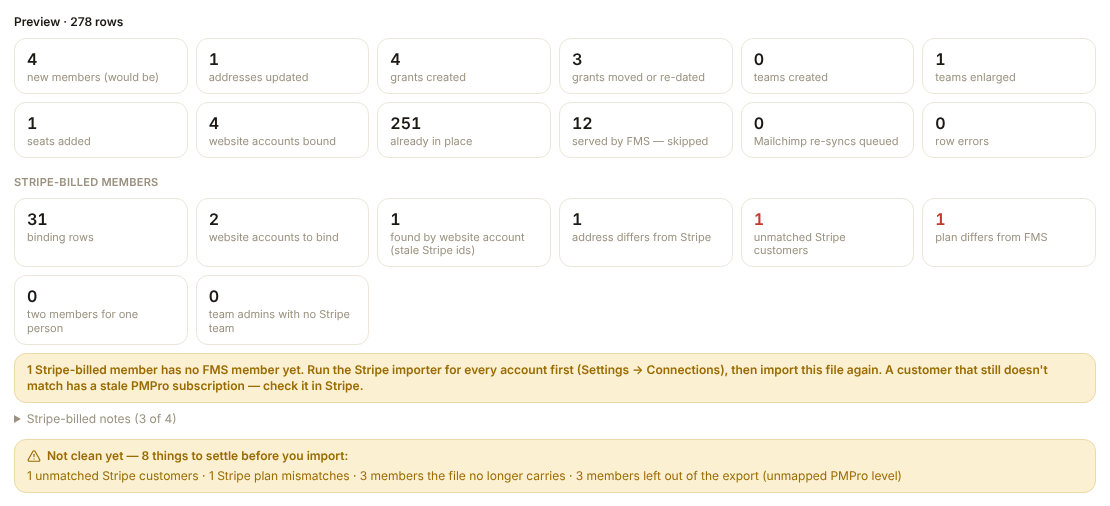
| On screen | Where to fix it |
|---|---|
| row errors | Open Row errors for each reason. |
| unmatched Stripe customers | Import that Stripe account first. Then check the customer in Stripe. |
| Stripe plan mismatches | The old plugin's plan is not what Stripe pays for. Check the member in Stripe. |
| two members for one person | Two FMS members share one person. Settle it on the member page under Website account. |
| team admins with no Stripe team | Their team subscription is not in FMS. Import that account, or map the team price. |
| Addresses or website accounts on more than one row | Settle each person on their member page, under Website account. |
| members the file no longer carries | See End the members PMPro removed. |
What the other counts mean
grants moved or re-dated are memberships whose plan or end date changed in the old plugin. served by FMS — skipped are members already handed over: FMS's record wins. teams enlarged are teams raised to the size in the file. A team is never made smaller. found by website account means the old plugin's Stripe ids were out of date. FMS found the member another way. A box about grants that have already ended is a warning, not a problem. See Step 2: Data.
Reading Verify
Verify compares every row with FMS and writes nothing. Each row lands in one box. A yellow box lists its first 20 rows. Show all N lists every one. Download list (.csv) saves the whole box as a spreadsheet. The result also stamps Verify clean on the Cutover page.
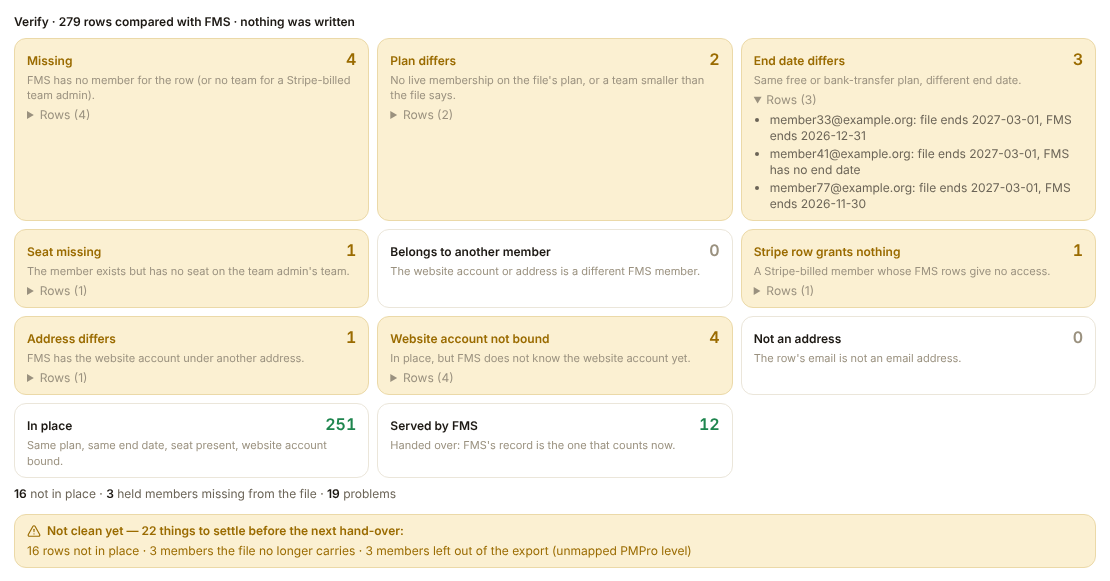
| Box | Means |
|---|---|
| In place | Same plan, same end date, seat present, website account linked. |
| Served by FMS | Already handed over. FMS's record is the one that counts. |
| Missing | FMS has no member for the row. |
| Plan differs | No membership on the file's plan, or a team smaller than the file says. |
| End date differs | Same free or bank-transfer plan, different end date. |
| Seat missing | The person exists but has no seat on the team. |
| Belongs to another member | The website account or address is a different FMS member. |
| Stripe row grants nothing | A Stripe-billed member whose FMS rows give no access. |
| Address differs | FMS knows the website account under another address. |
| Website account not bound | Everything else is in place. Import again to link it. |
| Not an address | The row's email is not an email address. |
Most boxes clear after you fix the cause and import again.
End the members PMPro removed
Importing only adds. When PMPro cancels a free or bank-transfer member, or removes a seat, FMS keeps them. Preview, Import and Verify all list them in a box headed held members the file no longer carries.
Ends memberships
Reconcile ends the free and bank-transfer memberships of everyone in the box. It removes their own team seats too. To undo one, give them their level back in PMPro and import again.
- Open Who and read the list. Each row shows what the member still holds.
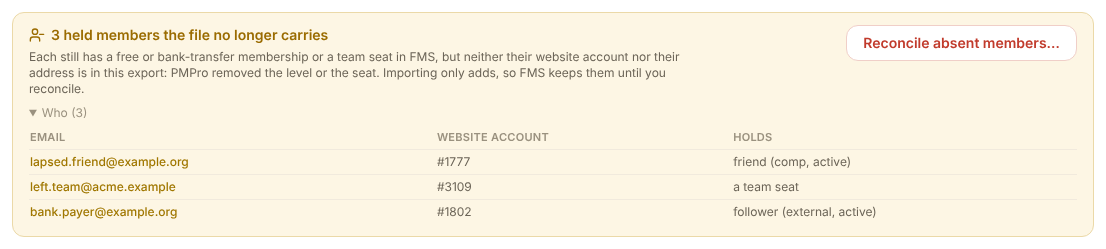
- Check two or three of them in WordPress. Their level or seat must really be gone.
- Press Reconcile absent members….
- Read every line in the dialog.
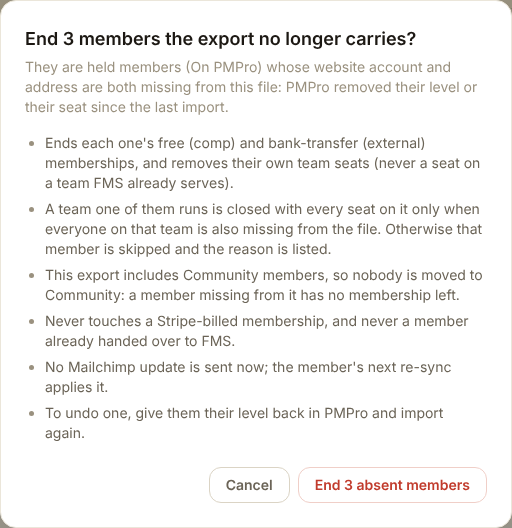
- Press End N absent members.
- Read the green Reconciled box. Open Why some were left alone if it lists any.
- Press Verify again. The box must not come back.
What reconcile does, and what it never does
It ends each member's free and bank-transfer memberships and removes their own seats. It closes a team they run only when everyone on that team is also missing from the file. Otherwise it leaves that member alone and says why. When the export had no Community members, anyone left with nothing goes on the free Community plan. It never touches a Stripe-billed membership. It never touches a member already handed over to FMS. It sends nothing to Mailchimp.
Related: Newsletter opt-outs · Hand everyone over to FMS.