Migration, start to finish
Every step of the move from the old membership plugin (PMPro) to FMS, in order, with what to do in each situation you may meet. Everyone moves on one morning. You end with every member served by FMS, PMPro switched off, nobody charged twice and nobody locked out.
You'll need
- An Owner sign-in on the admin portal (a Membership manager can press the hand-over)
- A WordPress administrator sign-in, with FMS Member Gate 0.56.1 or later
- The morning agreed with the Business owner (decision cards 18 and 52)
- One full rehearsal of the whole morning on a copy of the site first
Pick your path
| Choice | Pick it when | What differs |
|---|---|---|
| Everyone on one morning (the plan) | Always. The Business owner chose it on 27 October | The morning is Hand over everyone…. PMPro stays on for a few days so you can go back |
| One member at a time (fallback) | Only for someone the morning missed | Hand over this member or Hand back on the member's page. See Stragglers |
| Rehearsal first | Always, on a copy of the site | Same steps, test keys only. See docs/migration-runbooks/new-vps-test-cutover.md |
The sequence at a glance
The days count from T, the morning everyone moves. The Business owner sets that date.
| Phase | When | Where | Who | Undo |
|---|---|---|---|---|
| 1. Prepare | T-14 to T-7 | WordPress server, FMS server, admin portal | Thomas, Owner | Nothing changes |
| 2. Load the data | T-2 | Admin portal, WordPress server | Owner | Nothing members see changes |
| 3. Verify | T-1 | Admin portal, WordPress server | Owner | Nothing changes |
| 4. The morning | T | Admin portal, WordPress server, FMS server | Owner, Thomas, WordPress admin | Untick the switch, Hand back… |
| 5. The next days, PMPro still on | T+1 to T+3 | Admin portal, WordPress server | Owner | Untick the switch, Hand back… |
| 6. PMPro off | T+3 | WordPress server, admin portal, FMS server | WordPress admin, Thomas | Reactivate PMPro, then a restore |
| 7. Clean up | T+3, then T+10 | Admin portal, FMS server | Thomas, Marketing | Run the checks again |
Which server is which
WordPress and FMS run on different servers. The WordPress server is wp-admin: the plugin settings, the assistant under Tools → FMS Migration, and PMPro. The FMS server is where Thomas changes settings and restarts FMS. The admin portal is FMS's own screens, in a browser. The newsletter archive runs on the FMS server.
Phase 1: Prepare
Nothing in this phase changes anything members see. Do it in the two weeks before.
- Rehearse the whole morning on a copy of the site. Hand over everyone there, then switch PMPro off there.
- Open WordPress → Tools → FMS Migration and press Run checks. Fix every blocking failure. See Step 1: Prepare.
- Create the member pages and map them in the plugin. See Member pages.
- In the admin portal, check Plans lists Community, Friend, Follower, Fanatic and the team ladder.
- Open Settings → Connections and connect every Stripe account in read-only mode. Do not create its webhook endpoint yet.
- Ask Thomas to size the day and to check the link between the two servers. The numbers go into the plan.
- Check that a failed renewal keeps reading for 30 days (decision card 21). The failed-payment retry settings in each account's Stripe dashboard must retry for 30 days and then cancel the subscription. Thomas checks that the grace setting on the FMS server is 30 days, the default.
- Export the Mailchimp audience as a CSV with the Email Address and Tags columns. Keep the file and note the time.
Duplicate addresses
Two WordPress accounts whose addresses differ only by capital letters become one FMS member. Settle those in WordPress first.
Phase 2: Load the data
Everything loaded in this phase arrives On PMPro. The old plugin keeps serving everyone.
- On each Stripe account's page, press Preview import, map every price it lists, then Import. It runs in the background and resumes if it pauses. See Import existing subscriptions.
- Once every account is imported, create its webhook endpoint in that account's Stripe dashboard and paste the signing secret on the account's Webhook section. Both accounts must read Configured.
- Open Settings → Consolidation → Invoice history backfill, preview, then run it.
- In WordPress, press Export on the assistant, then Download JSON.
- In the admin portal, open Members → Import from WordPress. On card 1, Members and memberships — the WordPress export, choose the file, read the grey From the export file box, press Preview, then Import once it says Looks clean. See Import and verify members.
- On the same page, card 2, Newsletter unsubscribes — the Mailchimp audience export, choose the Mailchimp CSV, set the time it was taken, Preview, then Apply. See Keep members' newsletter opt-outs.
- In WordPress, press Sync restrictions from PMPro. Read the summary: it names articles that were locked through a whole category and are now locked one by one.
Moves money later
Nothing in this phase charges anyone. But once the webhook endpoints exist, Stripe events reach FMS. For a member still on PMPro, FMS only updates its copy. It never charges, cancels or emails them until they are handed over.
Phase 3: Verify
Do all of this the day before the morning.
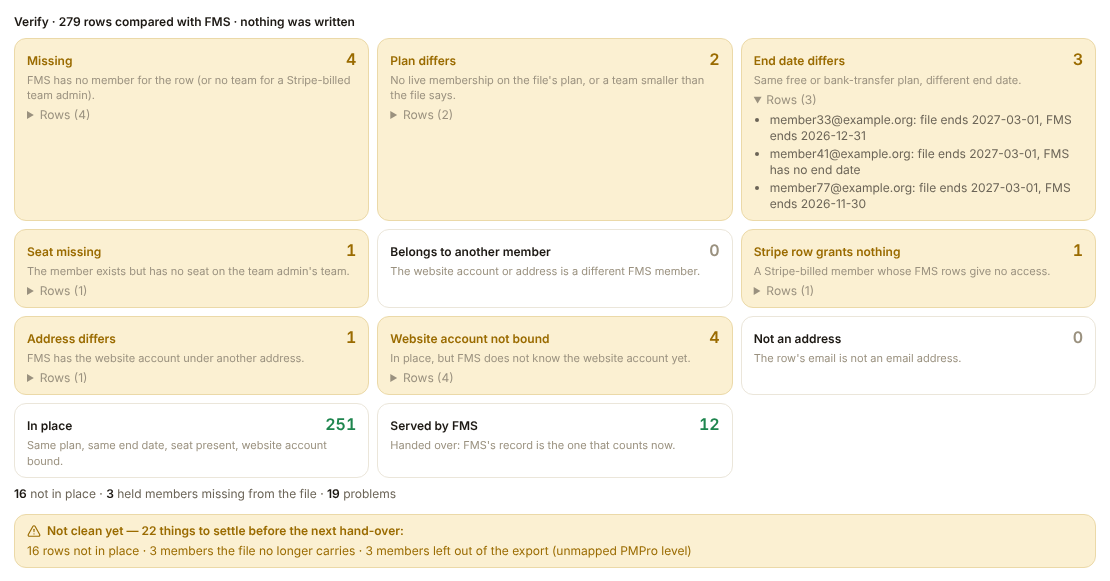
- On card 1 of Members → Import from WordPress, with the same file chosen, press Verify. Every row lands in a box. Open each yellow box, fix the cause, export and import again.
- If the card lists held members the file no longer carries, read the names. These are people PMPro removed after your export. Press Reconcile absent members… to end them in FMS too.
- Open Settings → Consolidation and run Payment health. Nobody may hold two live memberships with different tiers.
- Run FMS ↔ Mailchimp. The drift it lists should be lapsed members still holding paid newsletters, and nothing you cannot explain. Leave the fixes alone for now.
- In WordPress, press Run checks again. Only two rows may still fail: Every member handed over and New members join through FMS.
- On the copy of the site, sign in as one member of each kind and read a locked article. See Every kind of member.
- In the evening, take a full backup of FMS under Settings → Backup. Ask the WordPress host for a backup of the WordPress database too.
Phase 4: The morning
Three people: the Owner at the admin portal, Thomas at the FMS server, a WordPress administrator in wp-admin. Do the steps in this order.
- Check the admin portal says production. Open Health → Dead letters, read it, and replay nothing.
- Run the Stripe import on each account and the member import again. Press Verify, then Reconcile absent members… if it lists anyone.
- Thomas makes each Stripe account writable and arms Stripe writes on the FMS server.
- In WordPress, tick Enable FMS gating on this site. The banner reads FMS is serving handed-over members. Nobody moves yet.
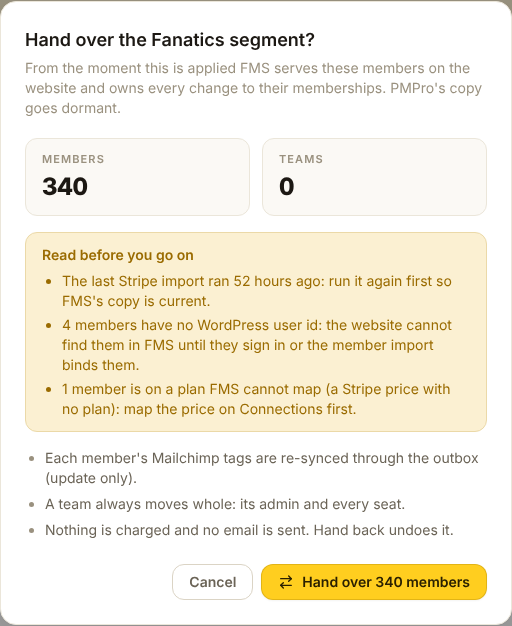
- In the admin portal, open Settings → Migration and press Hand over everyone…. See Hand everyone over to FMS. Still on PMPro must read 0.
- In WordPress, tick Send people who join to FMS's signup and checkout. See The switches for moving members.
- Do the checks below. Then Marketing sends the member email.
Checks, the first hour:
- A card member, a free member, a team admin, a seat and a Community member each sign in on the website
- Each sees FMS's account page. Card members reach the Stripe billing page
- A members-only article opens for a paying member
- Signed out, Join opens FMS's sign-up page
- The archive button takes a member whose plan includes it into the archive, signed in
- Run sweep in the assistant finds no errors
- Health shows the Mailchimp queue going down and no new dead letters
- Each Stripe account's webhook deliveries succeed, in the Stripe dashboard
- PMPro changes to handed-over members in WordPress lists no surprises
- The support inbox is quiet
Moves money
From step 3, FMS charges real cards. Joining is live too. Check a join with a real card and refund it, or wait for the first real member.
The Mailchimp updates take hours
The hand-over queues one Mailchimp update per member. For about 22,000 Community members this takes hours. New members go first, and payments never wait for it. Thomas measured how long beforehand.
Why the archive cannot be checked before the hand-over
While PMPro is switched on, the website shows the archive button only to members FMS serves. Before the hand-over that is nobody. After it, every member whose plan includes the archive gets it.
Phase 5: The next days, PMPro still on
PMPro stays switched on for two or three days. The Business owner decides how many, and may choose the same day. This is the only time going back is a click.
- Change members in the admin portal only, never in PMPro.
- Each morning, read PMPro changes to handed-over members in WordPress.
- Each morning, check Health, Dead letters and the support inbox.
- Someone missing from FMS? Import again. Open their member page and press Hand over.
If something is wrong
- The whole website: untick Enable FMS gating in WordPress. PMPro serves everyone again in seconds.
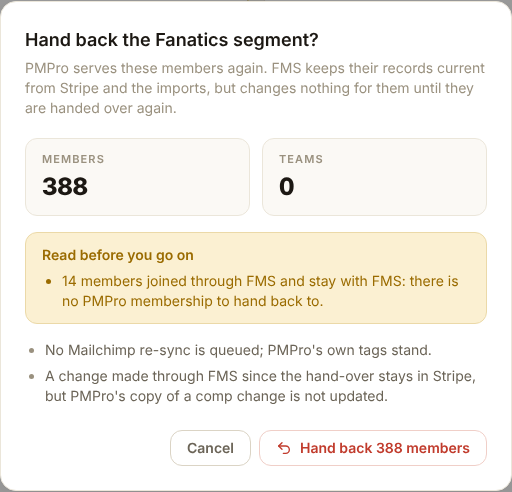
- One member: press Hand back on their member page. Only that member returns.
- Everyone, for FMS too: untick the switch, then press the red Hand back everyone… in the Go back card of the Cutover page.
Nothing a member did through FMS meanwhile is lost in Stripe.
Phase 6: PMPro off
- Check Still on PMPro reads 0 on the Migration page.
- In WordPress, press Swap pages, then Sync restrictions from PMPro once more.
- Press Open PMPro cutover panel. Every blocking check must pass. Press the deactivate button and type the confirmation word. It deactivates, it never deletes.
- Press Run sweep. Every member URL must answer, with no shortcode text and no new errors.
- Ask Thomas to retire PMPro's Stripe webhooks and switch off the global Stripe webhook secret.
Cannot be undone
Up to step 4, the master switch or a hand-back restores the old behaviour in minutes. After PMPro is off, going back means reactivating it and checking billing by hand.
Phase 7: Clean up
The same day PMPro goes off:
- Thomas arms Mailchimp fixes for the window. The Consolidation badge turns red.
- Run FMS ↔ Mailchimp, then Update all drifting. Run the check again a few minutes later.
- Run Mailchimp → FMS, then Strip all….
- Thomas disarms Mailchimp fixes.
The week after:
- Check the imported end dates, then switch on the membership emails under Settings → Email. See Membership emails. Card members follow each payment account's own switches: check them under Settings → Connections → Manage → Membership emails.
- Marketing sends the win-back campaign.
The full procedure is Step 3: Cutover and rollback.
Every kind of member
What happens to each kind, and what to check.
| Member | How they arrive in FMS | What to check | Watch out for |
|---|---|---|---|
| Pays by card through Stripe | The Stripe import, then the export binds their website login | unmatched Stripe customers is 0 in the preview | A different address in Stripe and WordPress is fine. Two FMS members for one person is not: the preview names them |
| Free (comp) with an end date | The export | Their end date in FMS, on the member page | An end date already in the past: FMS ends the membership within an hour. Fix the date in PMPro first |
| Pays by bank transfer | The export, marked external | Same as free | A renewal entered in PMPro after the export: run the import again, it moves the date |
| Free Community | The export, when the Community box was ticked | The Community count on the Migration page | They lose the 172 articles only paid members may read. Tell them before the morning |
| Team admin paying through Stripe | The Stripe import; the export sizes the team | Teams on the Migration page lists the team with its seats | A team whose Stripe row is missing shows as stripe_team_missing. No free team is created |
| Team admin paying by invoice or free | The export, with the team and its seats | Same | Seats that join after the export arrive with the next import |
| Team seat | The export, as a seat on the admin's team | The team's page | A seat that moved teams in PMPro: Verify lists the old seat; reconcile ends it |
| Personal plan and a team seat | Both rows, one member | The member page shows both | They move with everyone on the Cutover page |
| Monthly plan | As the yearly one | The plan name ends in monthly | Moves like the yearly plan |
| Gift recipient | The export, as a free membership with an end date | Their end date | A gift bought in PMPro but not yet claimed would not move. The owner confirmed none are outstanding; see below |
| Card failing on the day | The Stripe import, with a grace window | Past due, in grace on the import result | Stripe's own retries settle them. Do not stop them by hand |
| Card fails after the morning | Already in FMS; Stripe retries the card for 30 days | The member page shows the membership in grace | They keep reading for up to 30 days (decision card 21). Do not stop them by hand |
| On an old Stripe price nobody mapped | The Stripe import, under the raw price code | N unmappable plan on the Migration page | Map the price on Connections, then run the import again |
| No website account | The export finds no WordPress login | N no website account on the Migration page | The website cannot find them after hand-over. Fix on the member page under Website account |
| Two accounts differing by capital letters | Merged into one member | The preview's yellow Fix these before applying box | Settle on the member page |
| Removed in PMPro after your export | Still live in FMS | Verify, held members the file no longer carries | Reconcile absent members… ends them |
| Joined through PMPro before the morning | Adopted from the Stripe webhook, On PMPro | The morning's import and Verify | They move with everyone |
| Joined through FMS after the morning | FMS's from the start | Members list, Served by → On FMS | A hand-back never touches them |
| Cancelled in FMS, then their group is handed back | The cancel stays in Stripe | Stripe and the member page | PMPro's copy is out of date. Fix it in PMPro by hand |
| Missed by the morning's import | Not in FMS, or arrives On PMPro with a later import | Verify, Missing | Import again, then Hand over on their member page |
Things that happen during the move
FMS cannot be reached
Since plugin 0.57.0, each signed-in member keeps their last answer from FMS for up to 24 hours (decision card 20). Visitors stay locked. This holds once PMPro is off too.
| Outage setting | While PMPro is active | After PMPro is off |
|---|---|---|
| Keep each member's last answer | Members keep their last answer | Members keep their last answer |
| Fall back to Paid Memberships Pro | PMPro decides for articles with their own rule | Members keep their last answer |
| Keep content locked | PMPro decides for articles with their own rule. Others stay locked | Members are locked out |
The readiness row If FMS cannot be reached warns when the site is set to lock. A member who signs out during an outage stays locked until FMS answers. See The outage setting.
An import is more than a day old
The Migration page shows the box in red and the hand-over dialog repeats the warning. Run the Stripe import on each account and the member import again, then hand over. Skipping it means changes made on the website since are not in FMS. On the morning, run both imports first anyway.
PMPro changes a member you moved
In the days PMPro stays on, its nightly check can end a moved member's free membership on PMPro's old end date. That strips their newsletters in Mailchimp. FMS keeps serving them on the website and puts the labels back on its next update. The website's settings page lists each case under PMPro changes to handed-over members. Check any that looks like a real cancellation on the member's page.
A payment fails for a member still on PMPro
FMS does nothing. PMPro's retries own it. If the failure is one FMS would normally fix by moving the member to the other Stripe account, the event waits on Health → Dead letters marked legacy_held. After the morning, replay it only if the invoice is still unpaid. See Dead letters.
A member complains after a hand-over
Work down A member says they cannot read an article. If FMS has them, the usual cause is a stale sign-in: ask them to sign out and in. If FMS does not have them, their row was missing in Verify. Import again, then hand them over from their member page.
Staff need to change a member still on PMPro
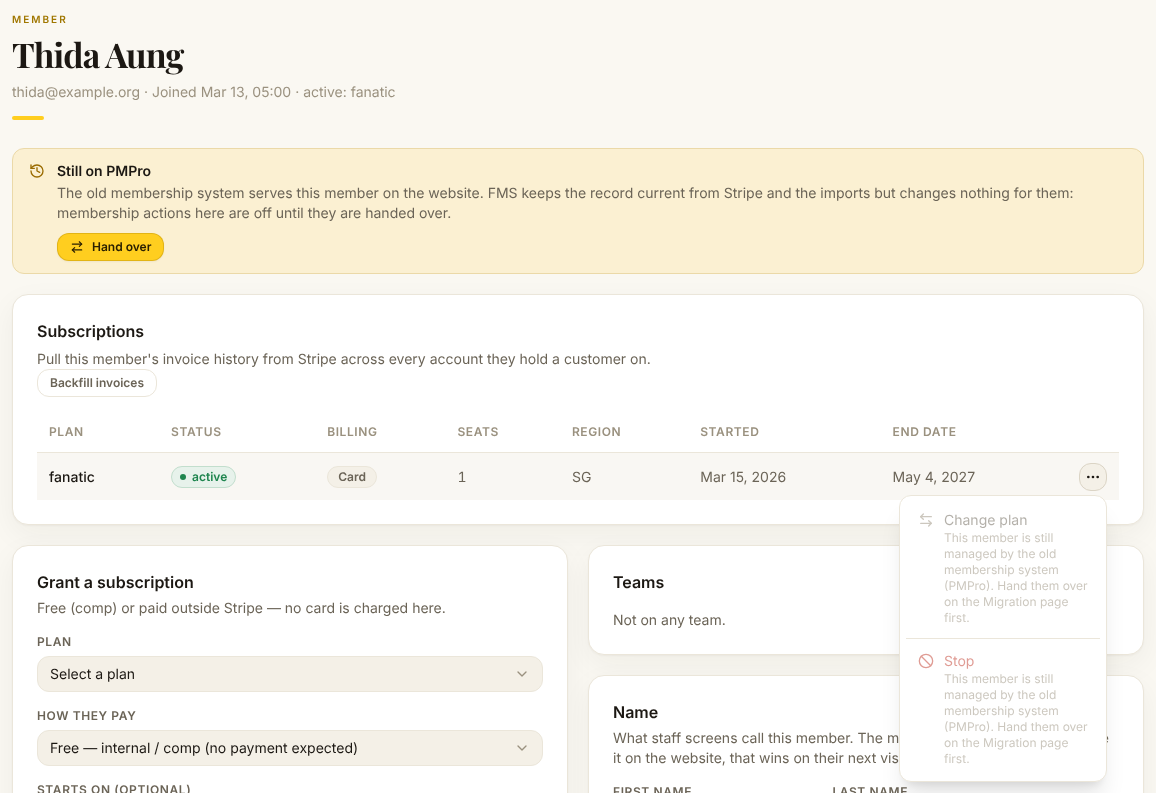
Before the morning, the member page shows a yellow Still on PMPro box and the membership buttons are greyed out, with the reason when you point at them. Make the change in PMPro, or wait for the morning. Changing a name, email, note or website login still works.
An article locked by a whole category
The restriction sync locks every article in a locked category one by one. An article filed into a locked category after the last sync has no lock until you sync again. Sync once more right before PMPro is deactivated, then set the access level on each new article.
A gift code or discount code from PMPro
No PMPro gift or discount codes are outstanding (owner, 27 Oct). If one turns up, grant the membership by hand: see Give a member free access.
A seat moved from one team to another
Verify shows the old seat under held members the file no longer carries and the new seat as seat missing until the import runs. Import, then reconcile.
Raw shortcode text on a page
The pages were swapped too early. Press Rollback on the assistant. Swap them only when PMPro is switched off. See Raw shortcode text.
Undo at each stage
| How far along | How to undo | What it cannot undo |
|---|---|---|
| Data loaded, nothing handed over | Nothing to undo. Members see no change | — |
| Switch on, nobody handed over yet | Untick the switch | — |
| Everyone handed over | Untick the switch to give the website back in seconds, then Hand back everyone… in the Cutover page's Go back card | A cancel or plan change a member made through FMS stays in Stripe |
| One member has a problem | Hand back on the member's page | The same |
| New sign-ups on | Untick the switch. Members who joined through FMS stay with FMS | — |
| Pages swapped | Rollback on the assistant | — |
| PMPro deactivated | Reactivate it, untick the switch, hand everyone back | Billing done through FMS meanwhile. Check it by hand |
The switch only changes the website
Unticking the switch leaves FMS sending Mailchimp updates for members it serves. Hand them back too.
Who does what
| Role | Does |
|---|---|
| Business owner | Sets the morning and how long PMPro stays on, answers decision cards 18, 52, 4 and 20 (21 is decided) |
| Owner (admin portal) | Imports, verifies, reconciles, seeds the opt-outs, hands everyone over, hands a group back |
| Membership manager | Hands over and hands back |
| WordPress administrator | The switches, the assistant's buttons, deactivating PMPro |
| Thomas | Sizes the day, the link between the servers, the webhook endpoints, Stripe writes, the Mailchimp window |
| Marketing | Tells members on the morning and after, sends the win-back campaign |
Check it worked
- Still on PMPro reads 0 and the Migration page's bars are full
- The website's banner reads FMS is serving everyone
- The URL sweep answers on every member page
- FMS ↔ Mailchimp and Mailchimp → FMS are clean apart from refused addresses
- Settings → Audit lists the hand-over under the person who did it
- A member whose plan includes the archive opens it from the website