Billing page
Where a member who pays by card manages their card, renewal and payments.
Where that is depends on who collects their money:
| They pay through | Their billing is managed on |
|---|---|
| Stripe | Stripe's own secure billing portal, as before. They change their card, cancel and resume there. |
| Opn Payments | FMS's billing page, described below. Opn Payments has no portal of its own. |
The provider's own portal is the safer place for card details and the bank's checks. So FMS builds its own page only where the provider has none.
How members get there
They press Change now on the Change your billing details card of the account hub. The Update your card button in the payment problem banner goes to the same place, straight to the card form. Since plugin 0.48.0.
- A member on Stripe lands in Stripe's portal.
- A member on Opn Payments lands on FMS's billing page.
FMS's page is not on the website. The website signs the member in and hands them over. If they come back after an hour, the website signs them in again and brings them back. If a member on Stripe opens FMS's billing page from an old link, FMS sends them on to Stripe's portal.
FMS's billing page
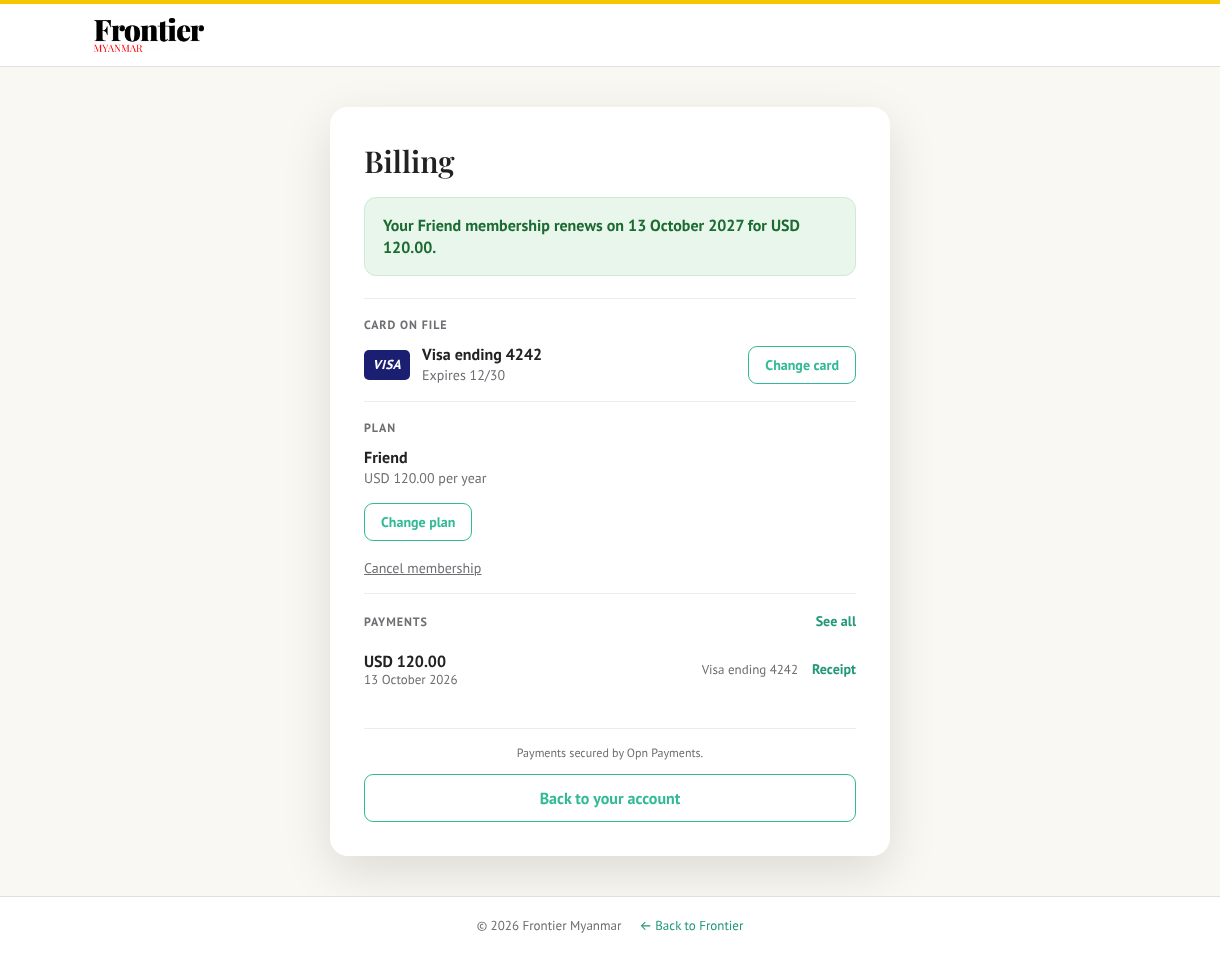
The line at the top
| They see | What it means | The button |
|---|---|---|
| Your Friend membership renews on a date for an amount | All is well. | None |
| Your membership ends on a date and will not renew | They cancelled at the end of the period. Access stays until then. | Resume membership |
| A payment of an amount is waiting for your bank's confirmation | Their bank wants them to approve a renewal. See the confirm payment banner. | Confirm payment |
| Your last payment of an amount failed | A renewal was declined. The line says until when access is kept. | Update your card |
| From a date you'll be on a plan at an amount | They chose a new plan for their next renewal. | Keep current plan |
A member paying in Thai baht (a JCB, American Express or UnionPay card on Omise) also reads, under the renewal line: Re-priced at each renewal at the rate of the day. You were last charged THB 4,120.00 at ฿34.32 per $1 on a date. The amount on the line is the renewal worked out at today's rate; the website's account page shows the amount they were last charged.
Every action answers on the same page, in a green or red box above the line. There is no separate "done" page.
The card on file
The page shows the card's brand, its last four digits and its expiry date. If the card expires before the next payment, an amber note says so.
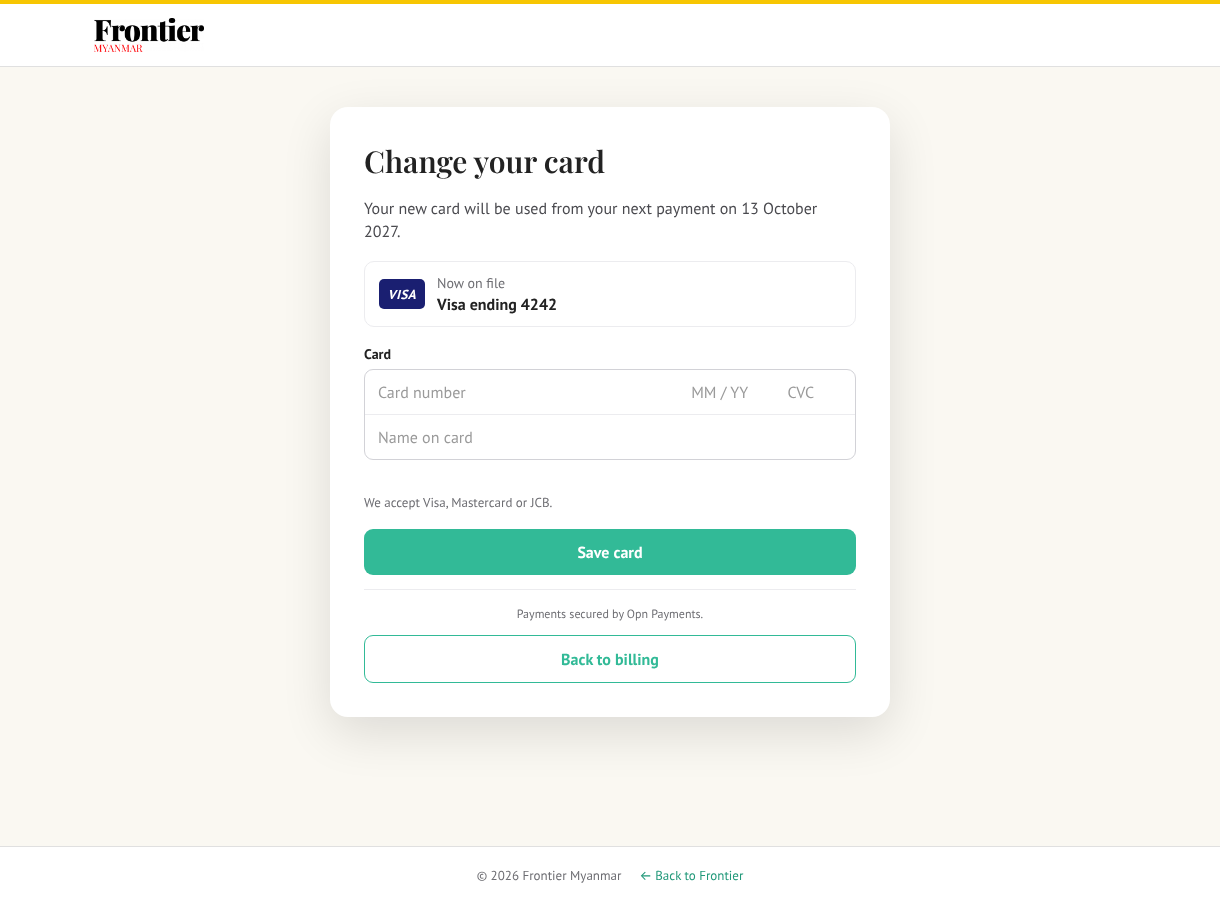
To change it, the member presses Change card, types the new card and presses Save card.
- A card their payment account cannot take is refused before anything is saved, with a message asking for another card.
- When the new card's type renews at a different price, an amber note says so as soon as the first digits are typed, before Save card: for example With a JCB card your membership renews at THB 4,120.00 a year, re-priced at each renewal at the rate of the day (Visa and Mastercard pay the dollar price; JCB, American Express and UnionPay the baht price).
- The old card stays on their record. FMS never deletes a card.
Moves money
Saving a card while a renewal has failed charges the new card straight away. The page says whether it went through. If the bank wants approval, it shows Confirm payment.
A declined new card is still saved. The member keeps access until the date on the line, and can try another card.
Changing plan
Change plan opens a list of plans on the page. Only plans with the same billing cycle are offered. The member picks one and presses Review change. The page says From a date you'll be on the plan at its price. Confirm change books it.
The new plan starts at the next renewal. Nothing is charged today, and nothing is refunded. Keep current plan undoes it any time before that date.
A discount code stays with the plan it was bought for. If the member's renewals are discounted, the new plan is shown and charged at its full price, and the page says Your discount code was for your current plan, so it ends with the change. Since 25 October 2026.
Cancelling
Cancel membership is a small link under the plan. It asks Your access stays until a date . Cancel anyway? first.
| Where | What it does |
|---|---|
| Billing page → Cancel membership | Stops the renewal. Access stays until the end of the paid period. Nothing more is charged. |
| Billing page → Resume membership | Undoes that cancel, any time before the period ends. |
| Cancel page → Cancel my membership | The same as the billing page's cancel (since plugin 0.48.1). The cancel page then shows the end date and Resume membership. |
When the period ends, the membership ends and the member becomes a free Community member, unless they still have another membership. The same rule holds for members on Stripe, who cancel and resume in Stripe's portal or on the cancel page.
Resume is refused when
- the period has already ended,
- the membership was replaced by a newer one they bought, or
- it is a team plan. A team admin changes or ends the team from the team page.
The page says which, in plain words.
Payments and receipts
The last five payments, each with its date, amount, card and a Receipt link. See all opens the member's invoices page.
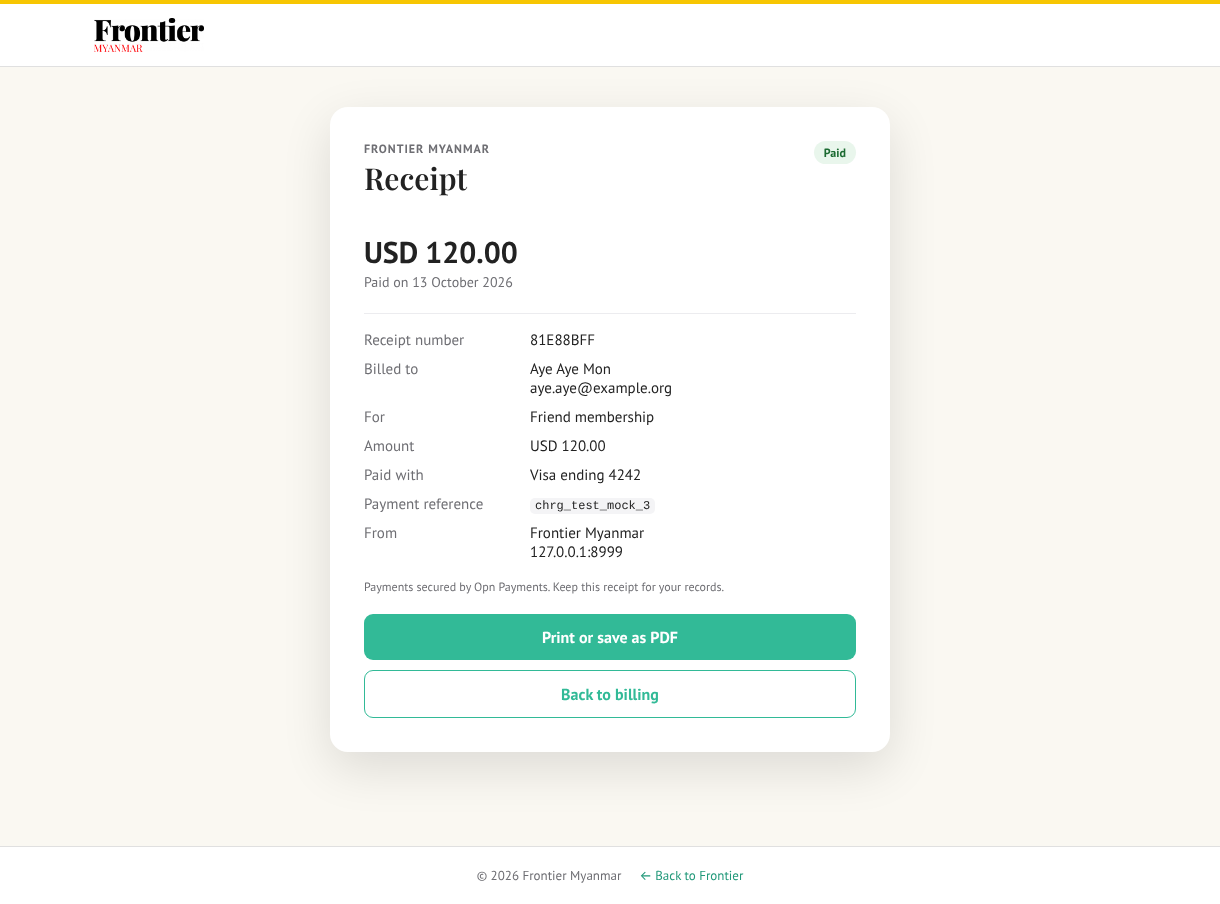
The receipt shows the amount, date, card, plan, payment reference and Frontier's name. A member can only open their own receipts. Anyone else gets Not found.
The invoices page has the same Receipt link for every payment. For a Stripe payment it opens Stripe's own invoice page, as before.
The footer
Payments secured by Opn Payments is the only place the page names the provider. Back to your account returns to the hub.
Where it is recorded
Every press on the page — cancel, resume, keep plan, change plan, save card — is a row on the member's Activity card and in Settings → Audit, on the channel Member pages. A refused press is recorded as refused.