Newsletter archive
Members whose plan includes the archive can read every newsletter we have sent, as articles, on a separate archive site. This page connects the website to it. Which plans include the archive is chosen in FMS, on Plans, not here.
You'll need
- The archive's web address, such as
https://archive.frontiermyanmar.net - The archive server already running. Thomas sets that up.
- Create a page called Newsletter Archive holding only
[fms_archive], and publish it. - Open FMS Membership and find Newsletter archive URL.
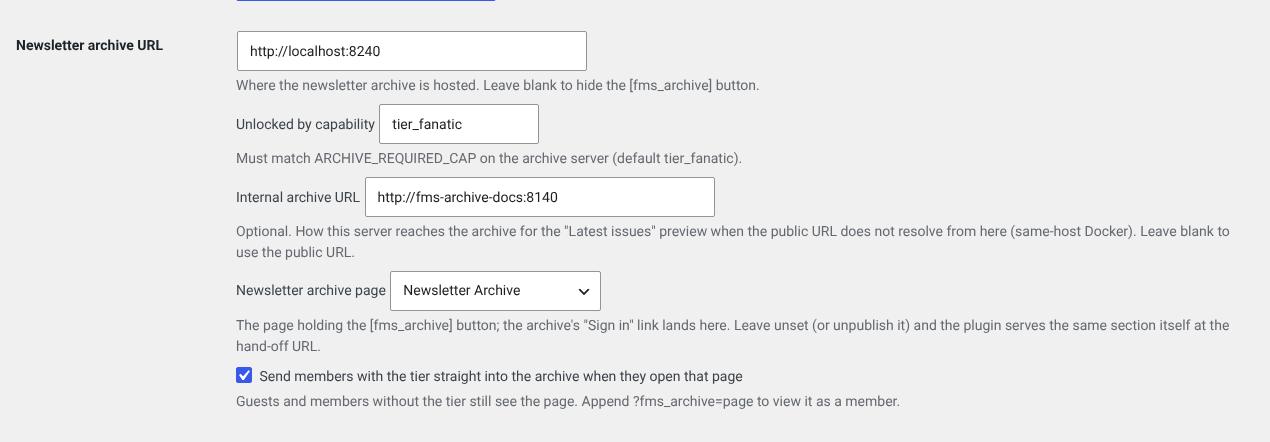
- Type the archive's web address.
- Choose your new page in Newsletter archive page.
- Leave the other fields as they are, and press Save Changes.
What each field does
| Field | What to put |
|---|---|
| Newsletter archive URL | The archive's web address. Leave it blank to hide the archive everywhere on the site. |
| Unlocked by capability | archive_access. It must match the archive server. Change both together or not at all. Plugin 0.38.0 moves the old tier_fanatic onto it by itself. |
| Internal archive URL | Blank. Only needed when the site cannot reach the archive by its public name. The Latest issues list is then missing from the page. |
| Newsletter archive page | The page holding [fms_archive]. The archive sends everyone who is not signed in here. |
| Send members whose plan includes the archive straight into it | On. Those members skip the page and land in the archive. This also works when no page is chosen. |
Seeing the page as a member who can get in
With the last box on, a member whose plan includes the archive never sees the page itself. Add ?fms_archive=page to its address to look at it while signed in.
Check it worked
- Signed out, opening the archive's own address brings you to this page
- Signed out, the page shows Log in to read the archive and Become a member
- A member on a plan without the archive badge on Plans sees why it is locked and See membership options
- A member on a plan with the badge lands in the archive, signed in, without pressing anything
- That member sees Newsletter archive in the account menu. Nobody else does.
- Their member page in FMS lists the visit on the Activity card
Watch the archive on Health
Save the archive's address on Connections. FMS then checks it every minute and raises an alert if it stops answering or stops syncing.
What each of these looks like is on the member side of the archive.
If no page is chosen
The plugin serves the same section itself, with the site's logo and a short footer. Members who can get in skip it in the same way (plugin 0.37.0 or later). It works, but a real page is better. It carries the theme's menus and can be linked from anywhere.
Setting up the archive server
That is a job for whoever runs the servers, not for this screen. The steps are in the repository at archive/README.md, under Deploying. The order matters: FMS first, then the archive, then this plugin at version 0.35.0 or later.
When updating to plugin 0.38.0, set ARCHIVE_REQUIRED_CAP=archive_access on the archive server in the same deploy. If the server still says tier_fanatic, the website offers the archive to every plan with the badge and the archive turns all but Fanatics and teams away.