Advertise the archive on the website
The FMS Archive Spotlight plugin turns newsletter issues into short public stories. Claude writes each one from the issue. You review it and publish it. Small ads then point readers to the archive from post lists, articles, the sidebar and the home page.
You'll need
- A Claude Platform API key, from platform.claude.com → API keys
- The archive's export key. Thomas sets
ARCHIVE_EXPORT_KEYon the archive server and sends it to you. - The FMS Archive Spotlight plugin installed and switched on
Connect it
- Open Settings → Archive Spotlight.
- Paste the Claude key into Claude API key.
- Check Archive URL. Empty uses the address on FMS Membership.
- Paste the archive's key into Export key.
- Press Save settings.
- Press Test connection. A green message names the model that answered.
The archive is behind Cloudflare Access
If Cloudflare Zero Trust protects the archive, it stops the plugin before the archive sees it. The card then says Cloudflare refused the request (403). Let the plugin through with a service token:
- In Cloudflare Zero Trust, open Access → Service Auth → Service Tokens → Create. Name it
FMS-Spotlight. Copy the Client ID and Client Secret. The secret shows only once. - Open Access → Applications → Add → Self-hosted. Use the archive's hostname with the path
api/export. - Add a policy with action Service Auth that includes the
FMS-Spotlighttoken. Then add Block for Everyone. - Back in WordPress, paste both values under Cloudflare Access and press Save settings.
- Empty Internal archive URL if the plugin should go through Cloudflare. Press Generate now.
Never pick Bypass for the policy. Bypass does not check the token at all, so the request falls through to the sign-in policy and is refused.
If the card says Cloudflare's security check (a challenge) stopped the request, the token is not the problem. Cloudflare's firewall stopped it first. Ask Thomas to add the website server's address and the path /api/export/ to the WAF skip rule (ops/RUNBOOK.md §1). The plugin sends the token only to the archive. The service token expires, so set a reminder a month before its end date.
Make the first spotlights
- Press Generate now. Each issue takes up to a minute.
- Read What it did on the status card.
- Open Posts → Spotlights.
- Open each draft. Check it against the issue in the archive.
- Edit anything you like in the block editor, then press Publish.
What a spotlight post looks like
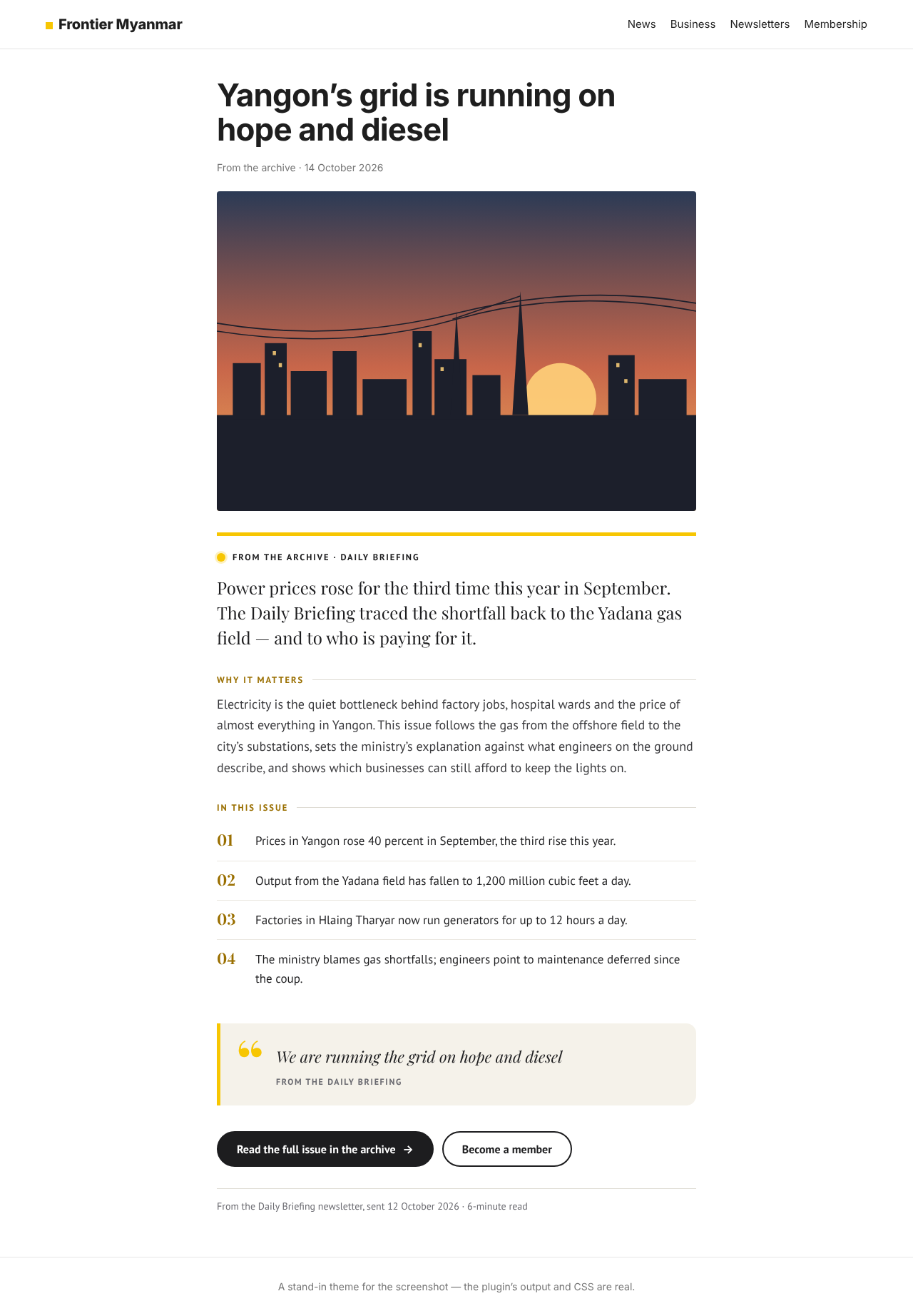
Since version 0.4.0 each post reads as a short story, top to bottom:
| Part | What it is |
|---|---|
| Illustration | A drawing in the newsletter's colour. An image from the issue replaces it. |
| Deck | One or two sentences under the headline |
| Hook | The opening, with a large first letter |
| Story | Two short paragraphs |
| The facts | A box of three to five facts. It sits beside the story on a computer. |
| Quote | At most one, word for word from the issue |
| What to watch | One line on what comes next, when the issue says |
| Buttons | Read the full issue in the archive and Become a member |
Claude picks the drawing from six motifs. Settings → Archive Spotlight → Illustrations shows one of each.
| Motif | Fits |
|---|---|
| Map | A place, a border, a route |
| Ledger | Prices, budgets, trade |
| Crowd | People and communities |
| City grid | Services and institutions |
| Horizon | An outlook or a long view |
| Current | Rivers, migration, supply |
Posts made before 0.4.0 keep their old look. To give one the new form, press Regenerate on it.
Not happy with one?
Hover over it in Posts and press Regenerate. Claude writes it again. The address, status and picture stay. To drop it for good, move it to the bin. A binned issue is never redone.
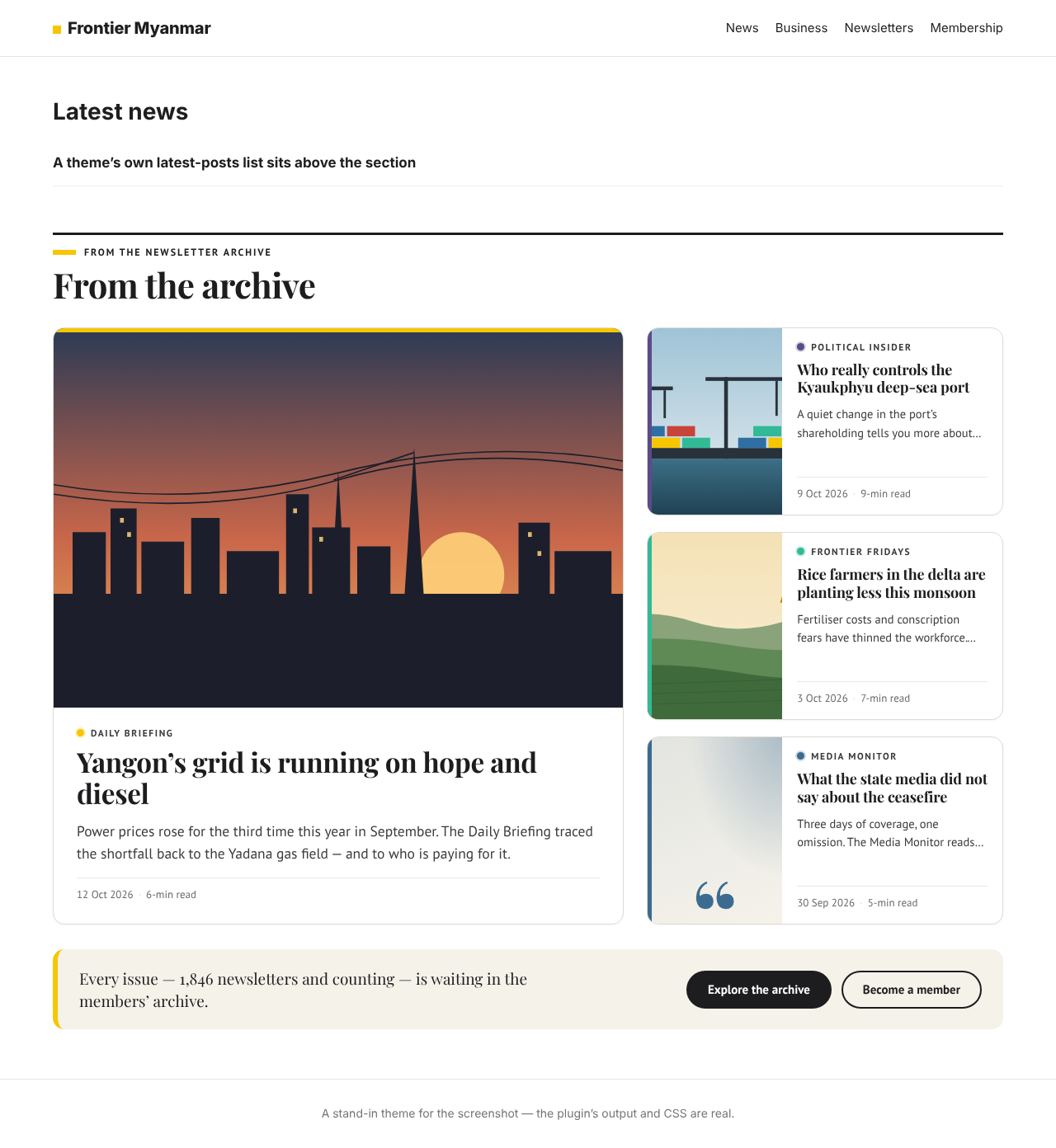
Put the section on the home page
- Edit the home page in the block editor.
- Add the Archive spotlight block where the section should go.
- In the sidebar, choose a Layout and the Number of spotlights.
- Press Update.
| Layout | Looks like |
|---|---|
| Section: lead story + list | One large card, smaller ones beside it |
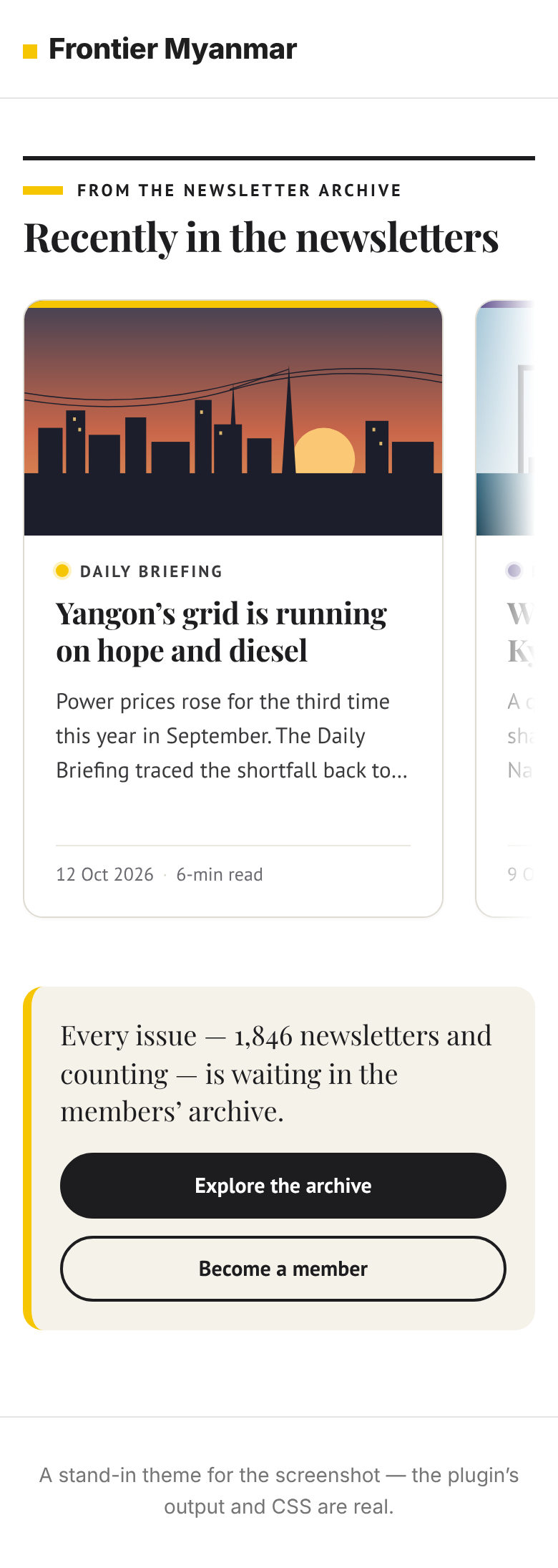
| Section: grid of equal cards | Three across on a computer, one on a phone |
| Section: scrolling strip | One row that slides sideways |
| Small card (newest spotlight) | One card, the picture beside the text when there is room |
| Slim banner (newest spotlight) | One line and a button |
| Headline list (sidebar) | Three to five headlines and one link |
In a classic page, use the shortcode [fms_archive_spotlight count="3" layout="grid"]. The small units take layout="promo", layout="banner" or layout="rail". Only published spotlights show.
Put small ads where readers are
Three small units carry the label From the members' archive, so readers see a house ad, not a news story.
- Open Settings → Archive Spotlight and scroll to Placements.
- Tick Show a unit in the blog, category, tag, date and author lists. Set After post, for example 3.
- Tick Show a unit inside each article. Set After paragraph, for example 3.
- Choose Small card or Slim banner for each, and press Save settings.
- For the sidebar, open Appearance → Widgets and add Archive spotlight.
- Open a category page and an article to see them.
What each reader is told:
| Reader | Small card says | Banner and list say |
|---|---|---|
| A member who can open the archive | Read it in the archive | Explore the archive |
| Everyone else | Members can read it | Become a member |
Where the units never appear
A list shows one unit per page. Page 2 shows the next spotlight. Search results and feeds get none. An article gets one banner at most. Pages, spotlights and posts with the shortcode get none. The banner never lands inside a quote, a list or a table. A short article gets it at the end. The list placement needs a classic theme. In a block theme, add the block to the list template instead.
When the home page has nowhere to add a block
Some themes build the home page from their own template, so there is no place for the block. Let the plugin place the section instead:
- Open Settings → Archive Spotlight and scroll to Home page.
- Tick Show on the home page.
- Press Save settings, then Open the home page. Come back to the settings.
- Under Where, open the lists of comments, classes and IDs found on the home page.
- Pick a place. On Frontier's site, choose After the comment with this text and type
end hero section. - If that comment or class appears more than once, set Which one: 1 is the first on the page, 2 the second.
- Set the Heading, Layout and Number of spotlights, and press Save settings.
- Open the home page again, then come back. The green line says the section is on the home page.
If the line is red, that place is not on the page and nothing was added. Pick another one from the lists. If the home page still looks the same, clear the page cache in your caching plugin or in Cloudflare.
Spotlights stay out of the news lists
Keep spotlights out of the site's other post lists is on by default. The theme's own lists, such as Latest, then leave spotlights out, so they never look like news stories. They still show in the Archive spotlight section, on their category page and in search.
What each setting does
| Setting | What it does |
|---|---|
| Model | Opus writes best. Sonnet and Haiku cost less. |
| House style / extra instructions | Words Claude must use or avoid. The limits below still apply. |
| Cloudflare Access | Optional. The service token for an archive behind Cloudflare Zero Trust. Sent only when both the ID and the secret are set. |
| Locked newsletters | Ticked: skips newsletters members cannot open yet |
| New posts are | Drafts for review, or published at once |
| Schedule | Off, daily or weekly, and how many new posts each run makes (1 to 10) |
| Category | Where posts are filed. Default From the archive. |
| Author | Who the posts are credited to |
| Show on the home page | The plugin places the section on the home page itself, at the place under Where |
| In post lists | A small card or banner after post N of the blog and category lists. Off by default. |
| In articles | A banner or small card after paragraph N of each post. Off by default. |
| Other post lists | On: spotlights are left out of the theme's own post lists, the blog and the feed |
| Join page | Where Become a member goes. Empty uses the archive page from FMS Membership. |
Each spotlight costs a little
Claude is paid per use on your Claude Platform account. The status card shows Tokens this month. Each post's tokens show in the Spotlight column on Posts.
Why the posts are short
The archive is for members. A spotlight sells the issue and never gives it away. So the plugin refuses any draft that is too long, and keeps at most one quote of 40 words that must be word for word from the issue. Every number must come from the issue too, the fact box included. A draft that breaks a rule gets one more try. If that fails, no post is made and the status card says why.
| Part | Limit |
|---|---|
| Headline | 12 words |
| Deck | 35 words |
| Hook | 45 words |
| Story | 2 paragraphs, 140 words together |
| Facts | 3 to 5. Label 4 words, fact 8, context 14. |
| What to watch | 30 words, or none |
| Pull quote | 0 or 1, 40 words, word for word |
| The whole post | 300 words, every part counted |
Check it worked
- Test connection shows a green message naming the model
- The status card shows Ready and a Last run time
- Posts → Spotlights lists the new drafts
- After you publish one, the home page section shows it
- With a placement on, a category page shows the small card after the chosen post
- Signed in as a member, the unit says Read it in the archive. Signed out, Members can read it.
- Read the full issue in the archive opens that issue after members sign in
If something goes wrong
| The card says | Do this |
|---|---|
| The archive's export is switched off | Ask Thomas to set ARCHIVE_EXPORT_KEY on the archive server |
| The archive refused the export key | Paste the exact key again into Export key |
| Cloudflare's security check (a challenge) stopped the request | Ask Thomas to add the website server to the WAF skip rule for /api/export/ |
| Cloudflare refused the request | Set or check the service token under Cloudflare Access. The policy must be Service Auth, not Bypass. |
| Something in front of the archive refused the request (403) | Check Internal archive URL. A proxy or firewall on the way is saying no, not the archive. |
| The Claude API refused the key | Paste a fresh key into Claude API key |
| Claude declined to write about this issue | Nothing. That issue is skipped from now on. |
| Claude's draft broke the limits twice | Press Generate now later. After two failures that issue is skipped. |